When Servers Were Physical: What Virtualization Really Changed
When I was an IT student in 2009, we mostly learned Windows Server and physical servers. Active Directory, DHCP, DNS, shared folders, printers, Exchange for messaging, domain management, security rules, and the most important part, backups.
We learned how to build an Active Directory structured by department, HR, Sales, Marketing, with security groups that automatically granted the right permissions on shared folders and printers. Everything relied on the main server.
Exchange had a special place. It was the most critical and the most feared role. When the mail service goes down, the whole company stops. The databases were large, backups took a long time, and restoring a single mailbox could turn into a project of its own.
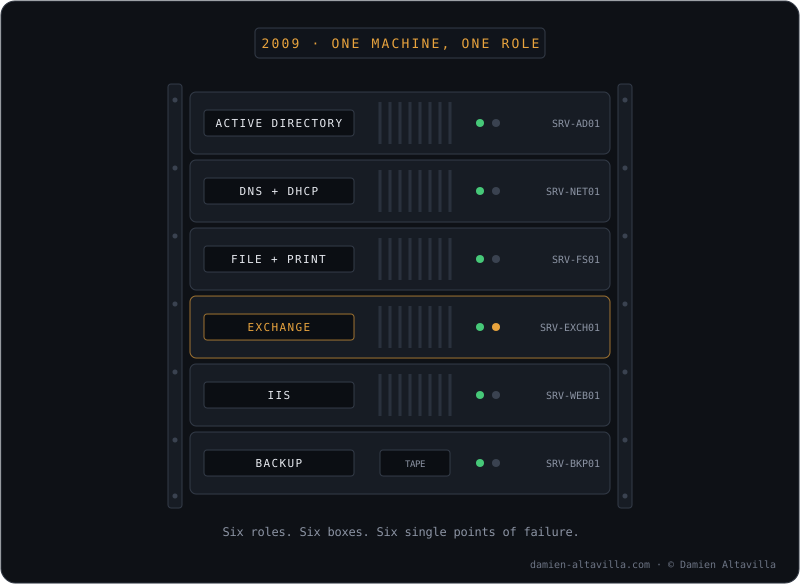
One role, one physical box. And Exchange, the one everyone feared.
And above all, we had to make sure backups were running properly and actually working. A backup you never tested is not a backup.
We spent a lot of time building, breaking things on purpose, fixing them, then rebuilding. Same thing on the network side, but that is not the topic of this article.
Over time, while we were still students, we started to understand how critical a well-designed system really is. Thousands of records, and the smallest mistake on our side could literally cause a disaster. A failed backup, a badly configured RAID, a slow reaction at the wrong moment, and you potentially lose years of work. Not to mention the legal side, since companies are required to keep certain data for several years, or the financial loss, which would be considerable.
Believe me, there is a lot of responsibility behind an IT system that works properly, and a lot of invisible work the end user never sees.
Still as students, we also discovered virtualization, with Hyper-V on the Microsoft side and the vSphere suite on the VMware side, ESXi on the hosts and vCenter for centralized management. Back then, it was already a revolution. A single server, in a rack or a classic tower, could run all the roles that previously required several machines. We connected to it remotely, and day-to-day management became much simpler.
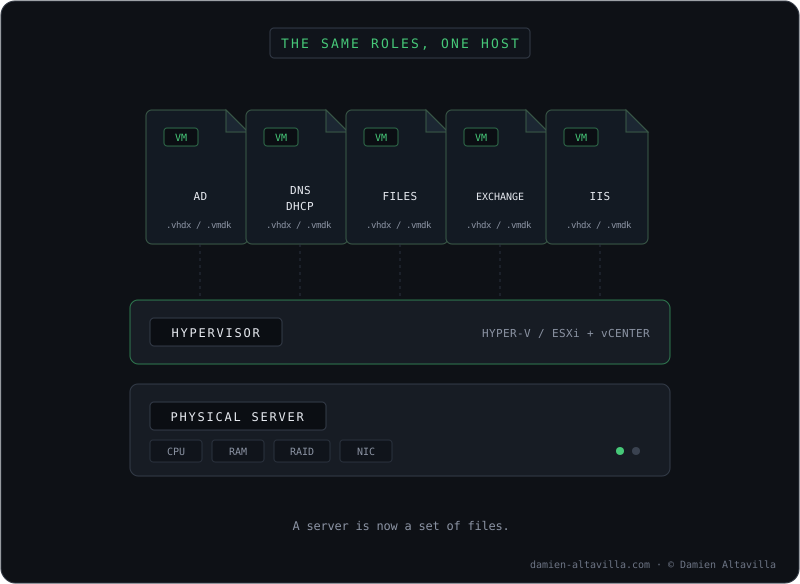
The same roles, consolidated on a single host.
But the real change was backup and restore.
On a physical server, you backed up the content, not the machine. In case of a hardware failure, you had to find compatible hardware, reinstall the system, the roles and the drivers, before even thinking about restoring the data. Hours of work, sometimes days, with no guarantee the restore would go well if the replacement hardware was different.
With virtualization, a server becomes a set of files. Backing up an entire machine means backing up its virtual disks and its configuration. You can restore it on any host, take a snapshot before an update, and roll back in seconds if something goes wrong.
And most importantly, you could finally test your restores for real. Boot a restored VM in an isolated network, check that it works, without tying up any hardware or risking anything in production. What used to be a good intention on physical servers became something you could actually do.
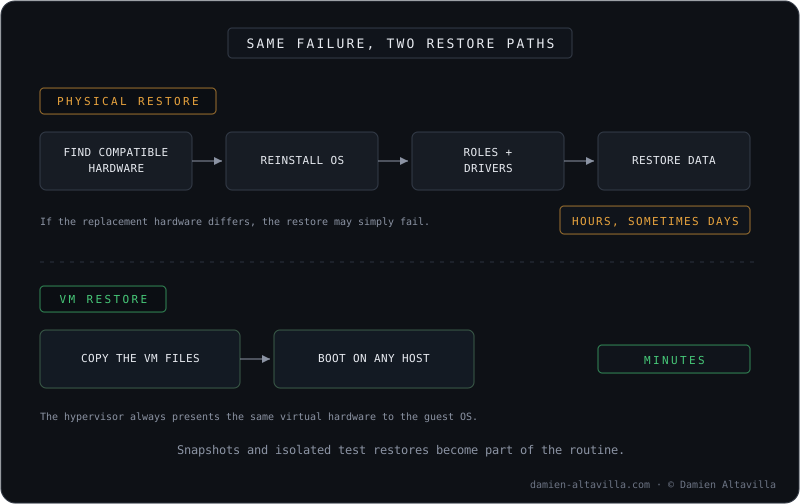
Same hardware failure, two very different days at work.
The same logic started to reach the desktop side, with thin clients. The idea was appealing: a minimal box on the desk, all the power on the server side, and a user workstation you could replace in minutes without reinstalling anything. In practice, at that time, it was not there yet. It was slow, the user experience was clearly below a regular workstation, and the infrastructure of that era did not have the power to run dozens of simultaneous sessions properly. The idea was right, the technology was not ready.
Literally a local cloud. And already back then, my teacher was talking about what would come next: the cloud, those virtual machines hosted somewhere else, and a network solid enough to manage everything remotely and connect from anywhere.
Looking back, what virtualization really changed was not performance. A VM did not make things faster, it made them recoverable. It sounds like a small nuance, and it changes everything: we moved from a world where a hardware failure meant days of rebuilding, to a world where it meant restarting a file somewhere else.
The rest followed the same logic. If a machine is only a set of files, then the question becomes: why should those files stay in a server room at all? My teacher was right, it was simply missing the network and the maturity to make it real.
That is exactly what the cloud eventually delivered, and that is what I will cover in the next article: Azure, and the AZ-104 certification I passed and have renewed every year since.